01
School overview
See what needs attention.
See unfinished registers, outstanding responsibilities and pending approvals. Open the relevant class or staff record to follow up.
See the school overview
For school owners and leaders
Bring attendance, staff responsibilities, schedules, family information and learning into one organised workspace. See what is complete, follow up outstanding work and give each person the access they need.
Guided school pilot · personal onboarding · no payment taken here
School or parent account? Sign in → Willow SchoolFictional daily routinesToday
Illustration only · explore the actual dashboard below
A clearer view for the owner
Open the school overview to see registers to finish, outstanding responsibilities and pending approvals. Move from the summary to the relevant record.
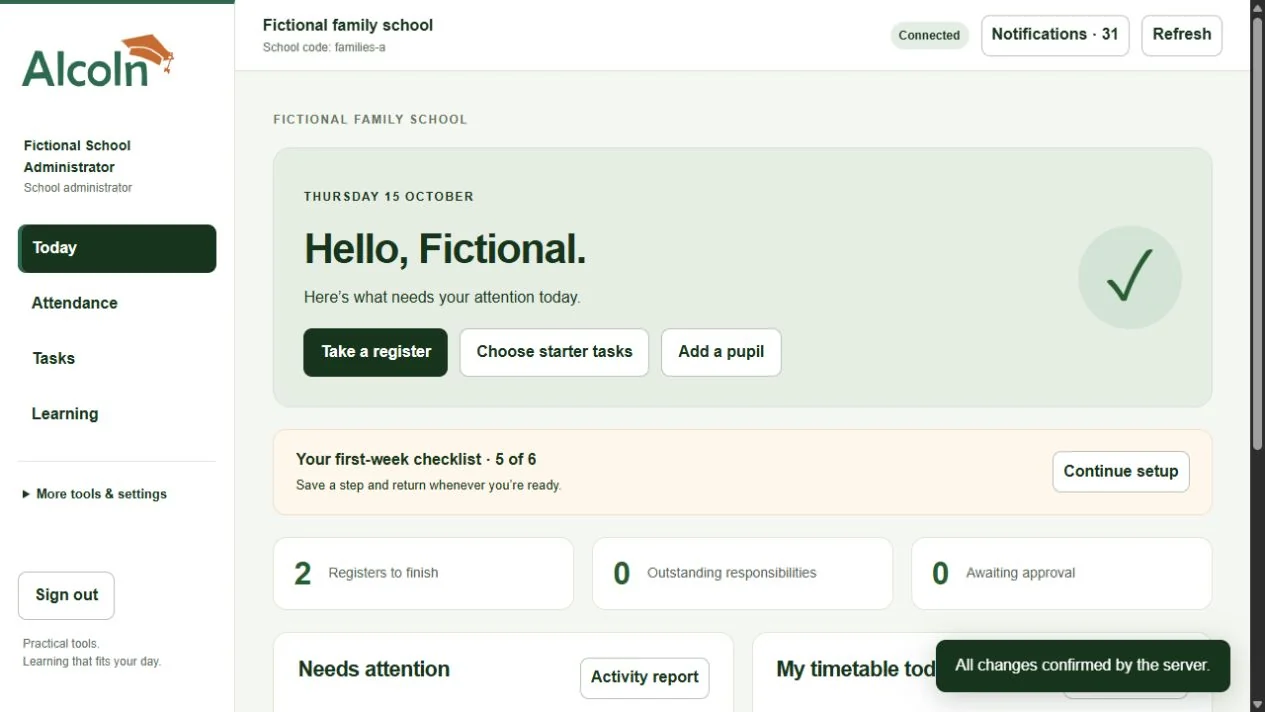
Check unfinished registers, due tasks and approval requests without opening every record.
Follow the relevant class, staff assignment or responsibility from the overview.
A saved register, a task declaration and a learning completion each have a clear meaning.
Nine connected areas
A practical toolkit for preschools and private schools across Africa. Start with attendance and responsibilities, then bring more of your school’s routines together.
School overview
See unfinished registers, outstanding responsibilities and pending approvals. Open the relevant class or staff record to follow up.
See the school overviewAttendance & pupil records
Take registers with one tick, identify missing entries and keep a traceable history of corrections and pupil changes.
Explore attendanceTasks & responsibilities
Give staff ready-made checklists, recurring responsibilities and due dates. See what is finished and what still needs a follow-up.
Explore staff tasksTimetables & school calendar
Coordinate lessons, staff availability and important dates. Keep the approved timetable available while changes are prepared.
Explore schedulesExamination preparation
Organise paper setting, review and secure readiness for internal exams, alongside preparation checklists for external examination boards.
Explore exam preparationParent connection
Give verified parents school information, trip requests and essential pupil updates. Follow up missing responses and information needing review.
Explore parent accessStaff learning
Assign available courses, set development deadlines and review recorded progress within the same school workspace.
Explore staff learningHouse teams & belonging
Organise houses with confirmed family preferences, captain and staff assignments, and a clear history of house points.
Explore house teamsReports & oversight
Generate attendance, responsibility, consent and pupil-information reports. Control access and review significant changes.
Explore reports & controlYour school chooses its routines and permissions. No pupil grading, payroll or fee-management system is included in this version.
Designed to be manageable
Created around everyday school routines, with configurable calendars and economical text-based tools.
Guided setup, import templates and selectable starter tasks help you build a routine without entering everything from scratch.
Give trusted staff the additional permissions they need. Class assignments and school boundaries still apply.
Download attendance and tasks on a trusted device. Offline changes stay pending until the server confirms them.
Use your own curriculum, class names, terms, working week and teaching routines.
Create authorised CSV exports and printable reports for everyday school follow-up. Keep downloaded and printed copies secure.
Parent information and consent, account changes, shared updates and staff learning need a connection. Offline working copies expire after 24 hours; conflicting changes require review.
For your staff
Teachers get their register, assigned responsibilities, timetable and learning. Non-teaching staff can use tasks and training without unnecessary pupil access.
Try the teacher routine →For your families
Parents see their linked children, school welcome information and trip requests. Essential allergy and emergency-contact updates remain protected and need school review.
See the parent connection →A practical way to get started
You do not have to introduce every tool on day one. Build a working routine, then add what helps.
Discuss your classes, staff responsibilities, calendars and priorities with ALCOLN.
Add school settings, classes and people. Use import templates and choose the starter tasks you need.
Start with registers and responsibilities. Introduce timetables, family access and available staff learning when ready.
Access, records and responsible use
School administrators manage their own school. Staff permissions and class assignments control what each person can do. Parent accounts are linked only after school verification.
Give staff specific capabilities. A house captain or staff-lead appointment does not grant account permissions.
Review important changes and use authorised reports for follow-up. Protect exported information and printed copies.
Essential allergy and contact information is encrypted, accessed online and excluded from offline working copies. Urgent changes still need direct school contact.
A guided school pilot
The first offering brings school tools, onboarding, a configurable staff allowance and selected available CPD courses into one manually managed school subscription.
Pricing is not yet published and no payment is taken here. A walkthrough request does not create an account or commit your school to a subscription.
Request a school walkthrough260 practical microcourses cover teaching, learning differences, school leadership and everyday organisation. Each has three lessons, a practical activity and a knowledge check. Administrators assign learning and review saved progress.
40 written policy starters help build shared practice. A named administrator reviews the school’s exact version before staff can be assigned to read it. Explore the full content on the learning page. Self-study completion is not accreditation.
See learning and availability →The ALCOLN practice charter
Practical guidance and repeatable routines support four everyday commitments.
Membership and checklist ticks are not accreditation, government approval or proof of overall school quality.
Keep everyday information clear and up to date.
Make follow-up thoughtful, timely and respectful.
Help everyone understand what needs doing.
Make space for practical learning and reflection.
About ALCOLN
ALCOLN stands for Academy for Learning, Care, Organisation, Leadership and Nurture.
We’re starting with practical tools for preschools and private schools, with room to grow into wider learning, care, organisation and leadership services.
We are building for the everyday needs of schools across Africa, with flexible settings and respect for each school’s curriculum, context and ways of teaching.
Useful support for the work that matters.
The workspace is available through an invitation-only pilot with guided onboarding. Request a demonstration and discuss onboarding with ALCOLN. There is no open self-registration.
No. An administrator can create a username account with the school code and a private, single-use activation code. Email is optional for these accounts.
No. Your school retains its subjects, teaching methods, plans and assessment content. The toolkit supports everyday organisation.
After online setup, supported browsers can download an authorised working copy for attendance and tasks. Changes stay pending until the server confirms them. Account changes, shared updates and LMS progress require connectivity.
ALCOLN includes its own LMS. Administrators assign available courses; staff read lessons, complete knowledge checks and see saved progress. The library includes 260 practical microcourses. Forty written policy starters can be adapted and reviewed in your school account before staff assignment.
Pricing is not yet published. The pilot uses one manually managed school subscription with staff and course allowances. No payment is taken on this website.
No accreditation is claimed. Membership records a commitment and access; course completion records the configured self-study requirements.
Yes. School administrators can give selected staff additional capabilities while keeping class and school access boundaries. Important actions can require confirmation or administrator approval according to school settings.
Authorised users can export supported records and generate printable attendance, task, consent and pupil-information reports. Downloaded and printed copies remain the school’s responsibility to store securely.
One school. A manageable start.
Choose the tools you need, create staff usernames and keep your own curriculum, terms and routines.
Practical staff learning, reviewed school policies and starter responsibilities in the same workspace.
Agree your staff and course allowance, setup assistance and support arrangements before subscription. Pricing is discussed directly; no payment is taken here.
Already have a fees or results system? ALCOLN can support everyday organisation alongside it. Ask about imports, authorised exports and a gradual start.
Request a school walkthrough. Tell us about your school’s routines, staff responsibilities and onboarding needs so we can arrange a useful demonstration.
The school workspace and integrated ALCOLN LMS are available through guided pilot onboarding. Explore all 260 microcourses and 40 policy starters publicly before you enquire. An enquiry does not create an account, enrol you on a course or commit you to a subscription.
Prefer email? This link opens your email application. Please do not send pupil records or sensitive personal information.
Your message is saved privately for ALCOLN to review. Please share only what we need to respond, and no pupil information.